How To Create Your Own SPL Token Without Writing a Single Line of Code - 2026 Guide
A step-by-step 2026 guide to creating your own Solana SPL token without coding. Learn the full no-code workflow, costs, and best practices using SoulMinter.

So you want to create a Solana token but don't know where to start? In this guide we will help you understand SPL (Solana Program Library) tokens and help you create one.
TL;DR
- An SPL token is any token on the Solana blockchain — every memecoin, community coin and stablecoin on Solana is one.
- You do not need to write code. The Solana CLI route pays only network fees; a no-code creator takes the same details through a form for a flat fee.
- Standard suits most projects, including memecoins and community coins. Pro exists for Token-2022 extensions, which have to be set at mint time.
- The whole flow takes about five minutes: name and symbol, description and image, authorities, optional socials and a custom mint address, then sign in your wallet.
- Most choices made at creation are irreversible, so review them before signing. A new token is not publicly tradable until someone adds liquidity on a decentralised exchange.
What Is an SPL Token?
An SPL, or Solana Program Library, token is basically every token created on the Solana blockchain. Every memecoin, community coin, stablecoin — you name it — is an SPL token. They all run on the same on-chain program, which the Solana Foundation documents under SPL Token Basics. If you are still weighing up which blockchain to use, here is why Solana is a popular choice for new tokens.
How Do You Create a Solana Token?
There are two options available, depending on how comfortable you are with coding and using a terminal.
If you know what you are doing, you can use the Solana CLI to create your token, paying just the network fees. Here is the official documentation published by the Solana Foundation: solana.com/docs/tokens/basics.
If you are not a coding wizard, don't worry — there's still a way. You can use our no-code SPL Token Creator tool to get started today: you just fill in the details, and the logic happens behind the scenes. Note that you will have to pay a small flat fee if you choose this option.
In this guide we are going to focus on the latter.
Should You Pick the Standard or the Pro Tier?
We offer two tiers for SPL tokens. Standard fits most projects, like memecoins and community coins, while Pro offers more extensive configuration if you are serious about your project. Pro exposes the Token-2022 token extensions documented by Solana, which have to be set when the mint is created rather than added later.
In this guide we will cover the Standard tier, as that is usually suitable for most projects and is much simpler for a beginner.
How Do You Configure Your Token?
Head over to our Standard Token Creator page and start filling out the details.
First, you need to pick a name and symbol, add a description, and upload an image for the token. Pretty straightforward.
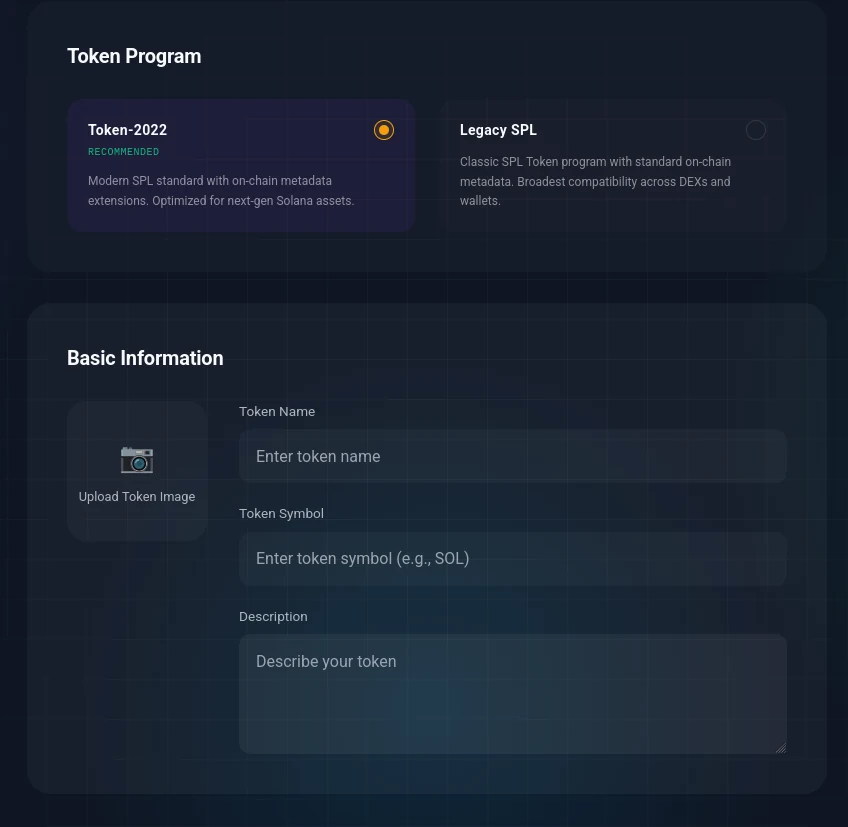
The mode selector and basic token information
Second, you need to decide on authorities. Authorities, as their name suggests, allow you to exercise certain actions after the token has been created. You can choose to keep them or revoke them. The latter is often used to instill trust in your token and prove to others that there is no way for you to freeze their tokens, change the token's name, or mint additional supply. Under the hood, giving one up calls the token program's SetAuthority instruction with the new authority set to none, which is why it cannot be undone afterwards.
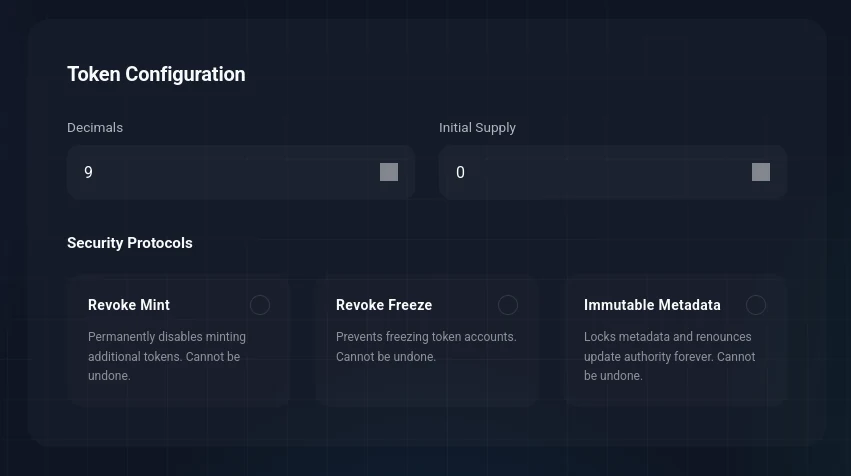
Token configuration and authority revocation
You also have the option to add socials to your token. You can add a website, Telegram, and X account.
You may add a custom mint address if you prefer. This means you can specify the characters your token's mint address starts with — for example: SM…
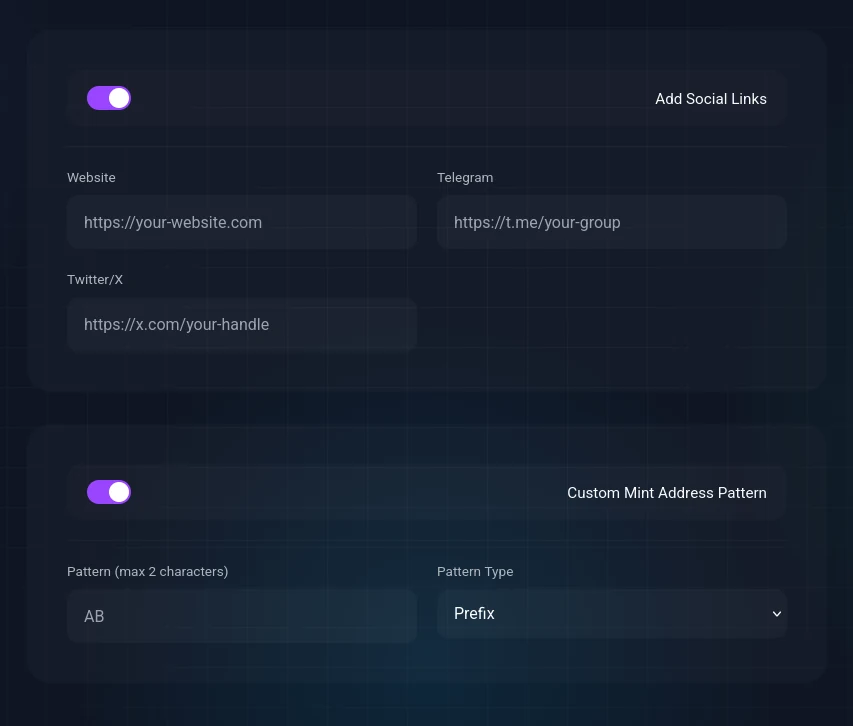
Adding socials and a custom mint address
If you have configured everything, make sure to double-check, as most of these actions are irreversible. If you are ready to move on, click Create. We will find your custom address (if selected) and set up the transactions. You will have to sign them using your connected wallet.
Congratulations! You just created your very own SPL token.
What Should You Do After Creating Your Token?
Depending on what you intend to use your token for, there are several options. A common one is adding liquidity. If you want your token to be publicly tradable, you will need to add liquidity. Our platform does not provide this service, as we are strictly a software tool, but don't worry — it is a simple process. You can use Meteora, Raydium, or any other provider of your choice to add liquidity to the token you just created.
If you need to revoke an authority or mint additional supply (if you left mint authority on), you can do that using our Manage Token page.
And that was it. You now have your very own SPL token! Good luck with your project!
Disclaimer
This guide is for educational purposes only and is not financial, legal, or investment advice. SoulMinter is an independent software tool and is not affiliated with, endorsed by, sponsored by, or partnered with the Solana Foundation, Solana Labs, Meteora, Raydium, or any other third party mentioned or linked in this article. External links are provided for reference only; we do not control their content. All product names, trademarks, and brands are the property of their respective owners and are used for identification purposes only. Always do your own research and use any third-party service at your own risk.
How to create an SPL token on Solana without code
Create a Solana SPL token through a no-code interface: pick a tier, enter the token details, decide on authorities, add socials and a custom mint address, then review and sign.
- 01
Pick a tier
Standard covers most projects, such as memecoins and community coins, and is the simpler choice for a first token. Pro exists for projects that need Token-2022 extensions configured at mint time.
- 02
Enter the token basics
Choose a name and symbol, add a description, and upload an image for the token.
- 03
Decide on authorities
Authorities let you take certain actions after the token exists. Keep them or revoke them. Revoking proves you cannot freeze holders’ tokens, change the name, or mint additional supply.
- 04
Add socials and a custom mint address
Optionally attach a website, Telegram and X account, and specify the leading or trailing characters of the mint address, for example SM.
- 05
Review and sign
Double-check everything, because most of these actions are irreversible. Click Create, then sign the transactions in your connected wallet.
Frequently asked questions
What is an SPL token?
SPL stands for Solana Program Library. An SPL token is any token created on the Solana blockchain: every memecoin, community coin and stablecoin on Solana is an SPL token.
Do you need to know how to code to create a Solana token?
No. The Solana CLI route requires a terminal and pays only network fees. A no-code creator takes the same details through a form and assembles the transaction for you, in exchange for a flat fee.
Should you pick the Standard or the Pro tier?
Standard fits most projects, including memecoins and community coins, and is much simpler for a beginner. Pro offers more extensive configuration through Token-2022 extensions, which have to be set at mint time.
Can you change a token after it has been created?
Most choices made at creation are irreversible, so review them before signing. If you kept an authority, you can still revoke it or mint additional supply afterwards from the Manage Token page.
Is a newly created token immediately tradable?
No. The token exists on-chain and sits in your wallet once the transaction confirms, but public trading requires liquidity on a decentralised exchange. That is a separate step and not a service SoulMinter provides.
Sources
- Solana Docs: SPL Token Basicshttps://solana.com/docs/tokens/basics
- Solana Docs: Set Authorityhttps://solana.com/docs/tokens/basics/set-authority
- Solana Docs: Token Extensionshttps://solana.com/docs/tokens/extensions
External links are provided for reference only. SoulMinter is an independent software tool and is not affiliated with, endorsed by, sponsored by, or partnered with the operators of these sites.
About the author
Share this article
Ready to Create Your Own Solana Token?
Put your knowledge into practice with SoulMinter's no-code token creation platform.
Create Token NowRelated Articles

How Do I Revoke Authorities After Creating My SPL Token?
Already created your Solana SPL token? Revoke mint, freeze or update authority in two minutes: connect the creator wallet, scan the mint, click revoke, sign.
What Is the Permanent Delegate Extension on Solana?
Solana's Token-2022 permanent delegate lets one address transfer or burn tokens from any holder's wallet. What it can do, what it can't, and who should use it.
Soulbound Tokens on Solana: The Non-Transferable Extension Explained
Solana's Token-2022 non-transferable extension makes a token permanently soulbound. It can still be minted and burned, but it can never change wallets.